Bold resume theme
Contrast Banner
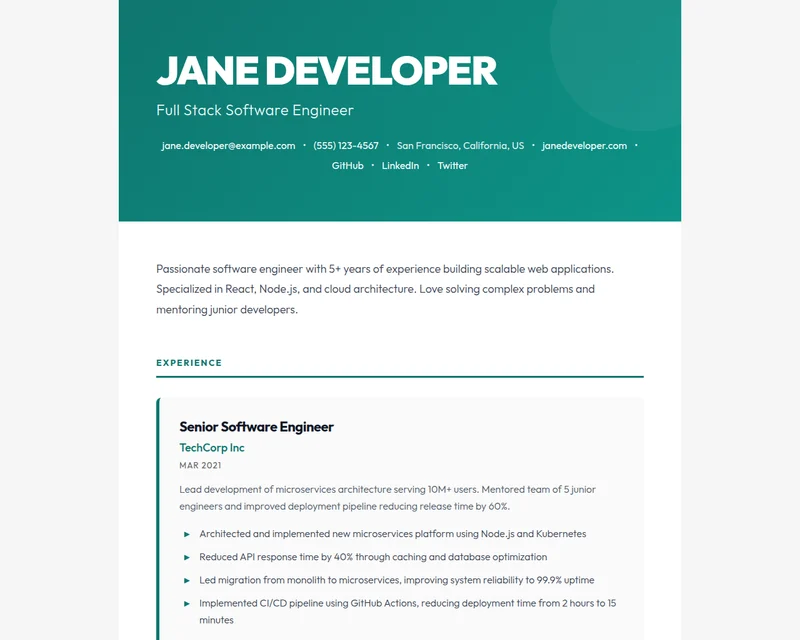
A dark green banner carries a large white identity and a compact contact row. The rest of the document stays open, with strong black text and restrained section rules.
Back to all themes
- Style
- Bold
- Layout
- Single column
- Colour
- Green
- Used by
- New
- Made by
- JSON Resume Team
Use Contrast Banner
On jsonresume.org
In the editor, pick Contrast Banner from the Theme menu and save. Your page at jsonresume.org/@you changes straight away.
Open the editorNo resume here yet? Start one in Contrast Banner: upload the one you have or answer a few questions.
In your resume.json
Set the theme in meta, whether your resume lives here or in a GitHub gist:
resume.json
"meta": { "theme": "contrast-banner" }Try it on your resume first
Add ?theme=contrast-banner to your link, like jsonresume.org/@you?theme=contrast-banner. Nothing is saved.
Ask your AI assistant
With jsonresume.org connected, say “Switch my resume theme to Contrast Banner.”
Connect an assistantMore bold themes
 Bold Header StatementBold · Single columnMagazine-inspired layout with commanding header and confident personal brand aesthetic.6 public resumes
 Monochrome NoirBold · Single columnSharp, modern, ultra-clean theme with bold contrasts and minimal design. Reads like an art catalog with condensed sans typography and thin white separator lines.3 public resumes
 BrutalistBold · Single columnRaw concrete brutalism with heavy 4px black rules, oversized uppercase Archivo Black headings, hard edges, monospace spec labels, numbered sections, and offset block-shadows. Stark black-on-white with a single harsh safety-yellow accent.2 public resumes
 Urban TechnoBold · Left sidebarBrutalist tech theme with high contrast, dense two-column layout, and bold typography. Black borders, uppercase section titles, and monochrome palette — power through simplicity.2 public resumes